

How to Choose a School Management System: Features, Integrations, and Build vs Buy
A school management system (SMS) decision affects parents, teachers, finance, and regulators for years. Use this checklist to compare vendors, integrations, and when custom software is the better bet.
Choosing a school management system is closer to selecting an operating system for your institution than buying another SaaS login. Admissions, attendance, fees, exams, transport, parent communication, and regulatory reporting all touch the same student record. A weak choice shows up as duplicate spreadsheets, angry parents, and finance teams reconciling fees at midnight.
We have delivered custom education platforms—including a multi-role school management system case study with web and mobile apps—and we also advise schools evaluating off-the-shelf products from our ready-made solutions catalog. This guide is written for principals, IT leads, and operations heads who need a structured comparison, not a vendor slideshow.
Who this guide is for
The same checklist applies whether you run a single private school, a K-12 group, or a college with multiple departments—but weights change. K-12 emphasizes parent apps and fee collection; higher ed emphasizes course registration, credit hours, and LMS integration. Multi-campus groups should prioritize centralized reporting with campus-level permissions from day one.
Core modules: the non-negotiable checklist
Vendors bundle features differently. Use this module checklist in RFPs so comparisons are apples-to-apples—not logo slides.
Student information and academics
- Student profiles, guardians, siblings, and enrollment history.
- Class sections, subjects, timetables, and teacher assignments.
- Attendance (daily/period), late marks, and absence notifications.
- Exams, grading schemes, report cards, and transcript generation.
- Homework, assignments, and learning resource links (or LMS handoff).
Admissions and onboarding
- Online inquiry forms, document upload, and interview scheduling.
- Merit lists, waitlists, and seat capacity per grade.
- Fee plans assigned at admission with pro-rata rules.
- Bulk import from spreadsheets with validation reports.
Finance and fees
- Fee structures, discounts, scholarships, and sibling concessions.
- Invoices, receipts, online payments, and reconciliation.
- Arrears tracking, reminders, and defaulter workflows.
- Integration to accounting (QuickBooks, Xero, Tally, or local GL).
HR and staff
- Staff records, contracts, qualifications, and substitutions.
- Leave policies tied to payroll if in scope.
- Role-based access for teachers vs admin vs accountants.
Communication
Parents judge your SMS by the mobile experience—not the admin demo. Push alerts for attendance and fees should land in an app they already use, with delivery logs finance and admin can audit.
- Parent app notifications (push/SMS/email) with delivery logs.
- Circulars, events, and consent forms.
- Teacher–parent messaging with moderation and retention policies.
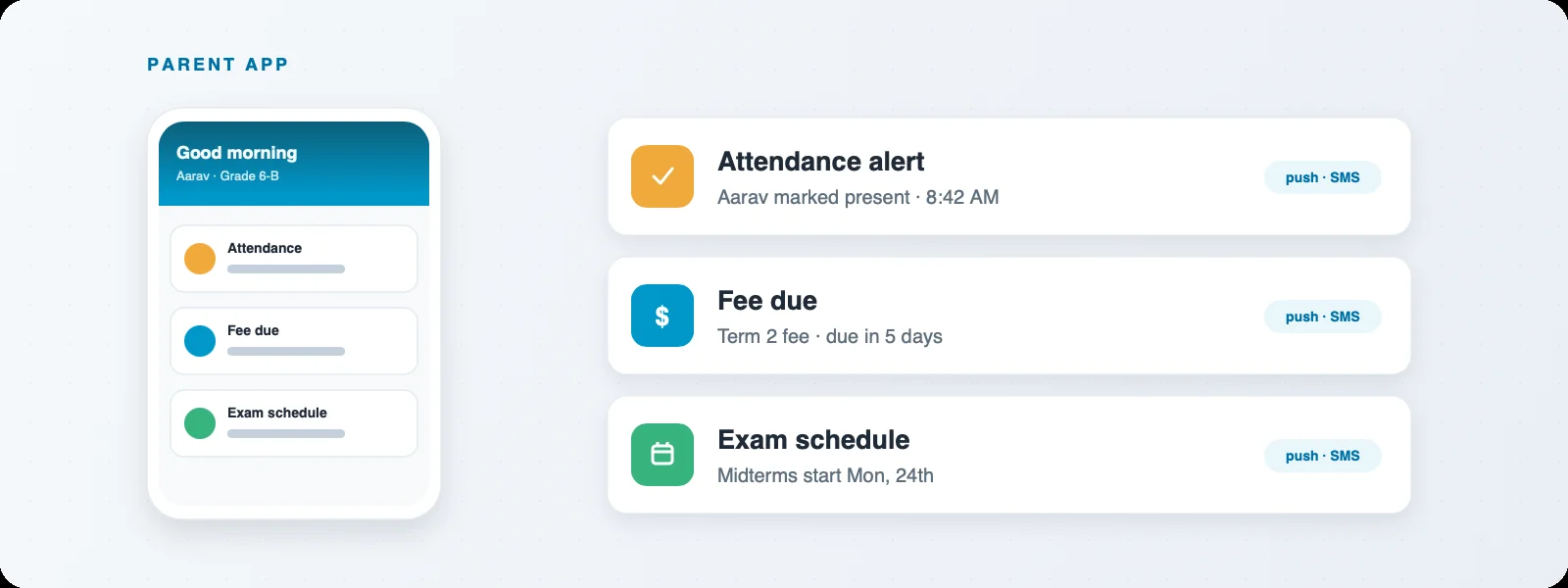
Parent mobile app in a school SMS: attendance alerts, fee dues, exam schedules, and circulars in one place—what parents actually open daily.
Integrations: where school software succeeds or fails
A school SMS rarely stands alone. Treat integrations as first-class requirements—not phase-two surprises.
Common integration categories
- Payment gateways — local methods parents actually use; refund and partial payment rules.
- Biometric / RFID attendance — device protocols, offline buffering, duplicate scan handling.
- LMS — Google Classroom, Moodle, Canvas: single sign-on and grade passback.
- SMS / WhatsApp providers — template approval, opt-out, and cost controls.
- Government reporting — export formats for district or national systems.
- Library, transport, and hostel modules — often custom; confirm API or import paths.
Integration questions for vendors
- Do you offer webhooks and documented REST APIs, or only CSV exports?
- Who owns retry logic when the payment gateway times out?
- Can we run a staging environment with the same integration keys pattern?
- What is the SLA when a third-party API changes (e.g., OAuth scope updates)?
Our ERP development practice treats education platforms as integration hubs—see how we approached multi-role access and reporting in the school management system case study.
Build vs buy: an honest decision matrix
Off-the-shelf school products win when your processes match the vendor's defaults and you need speed. Custom or tailored builds win when your differentiation, regulations, or multi-entity structure do not fit a template.
Buy (or configure SaaS) when…
- Standard K-12 workflows with minor configuration.
- Vendor has proven customers in your country and regulatory context.
- Total cost of ownership (licenses + implementation) beats 18-month custom build.
- You accept product roadmap dependency for new modules.
Build or heavily customize when…
- Multi-campus groups need unusual hierarchy or white-label parent apps.
- You combine school operations with proprietary programs (vocational, franchise networks).
- Integrations are dense and vendors quote expensive professional services.
- Data residency or security policies require code-level control.
- You already own IP and want to productize for other schools—our ready-made solutions path starts here.
Hybrid is common: buy core academics, build transport or alumni modules on the vendor API—if the API is real. Ask for a proof-of-concept integration in the evaluation phase, not after contract signature. Plot finalists on a build vs buy scorecard (time, cost, risk, and differentiation) before the board signs.
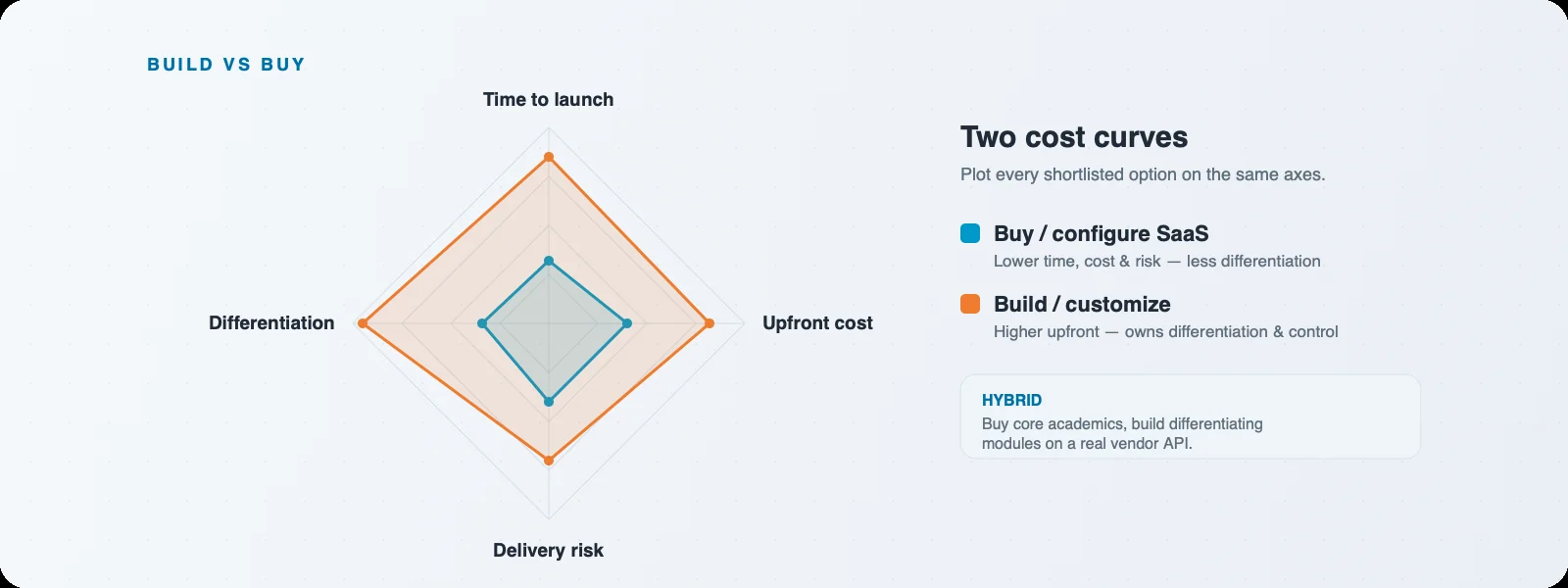
Build vs buy scorecard: weigh time to market, customization, integration depth, and five-year TCO before you sign an SMS vendor contract.
Evaluating vendors: beyond the demo
Run a structured pilot
Give two finalists the same scenarios: admit a student, transfer section mid-year, apply sibling discount, mark attendance from biometric import, generate report cards, and post fees to accounting. Score task completion time and errors—not aesthetics alone.
Reference calls that matter
- Schools that failed implementation with this vendor—why?
- Peak load: first day of term notification blast.
- How long do bug fixes take in production?
- Did finance actually stop using parallel spreadsheets?
Contract and data ownership
Clarify data export formats, exit clauses, and who owns historical records. Schools switch systems; painful exits usually trace to vague data portability terms.
Security, privacy, and compliance
Student data is sensitive. Minimum bar: role-based access, audit logs for grade and fee changes, encryption in transit and at rest, regular backups with tested restores, and parental consent flows where required.
- SOC 2 or ISO reports from vendor—or your own controls if self-hosted.
- Separate admin accounts; no shared principal passwords.
- PII minimization in parent apps (mask phone numbers in UI where possible).
- Incident response contact and breach notification timelines in contract.
Implementation and change management
Technology fails when teachers are not trained before go-live. Plan phased rollout: academics before finance, or vice versa per your pain point—but never big-bang on exam week.
Implementation timeline (typical)
- Weeks 1–4: Data migration templates, master data cleanup, roles.
- Weeks 5–8: Pilot campus or grade band, fix workflows.
- Weeks 9–12: Parent app launch, payment gateway live, support desk ready.
- Ongoing: Term-based tuning, report card cycles, regulatory exports.
Data migration pitfalls
Dirty legacy spreadsheets cause more delays than software bugs. Budget time to reconcile student IDs, guardian phone numbers, and opening fee balances before import.
Total cost of ownership
Compare five-year TCO: licenses per student or per campus, implementation fees, payment gateway charges, SMS costs, hardware (biometric devices), training, and internal IT time. A cheaper per-seat license with expensive customization services often loses to a moderate license with standard workflows.
Mobile experience for parents and teachers
Parents live on mobile; teachers increasingly mark attendance and post homework from phones. Evaluate app store ratings, offline behavior, and whether the vendor ships both iOS and Android on feature parity. Custom builds should treat mobile as primary for parent workflows—not a responsive afterthought. Our mobile app development team often pairs with education ERP backends we design for API-first access.
The best school SMS is the one your accountants and homeroom teachers will use on a rainy Monday—not the one with the longest feature PDF.
Triaxo Education Practice
Next steps
Download this checklist into your RFP, run two pilots, and insist on integration proofs. If your requirements consistently exceed vendor templates, talk to us about custom software or extending a ready-made education base—without starting from a blank repository unless necessary.
Recent Posts