

ERP for Software Companies: Signs You've Outgrown Spreadsheets
When project hours live in one tool, payroll in another, and margin in Excel, leadership is guessing. Here are the operational signals that software companies need a unified ERP—and how to migrate without stopping delivery.
Spreadsheets are undefeated for quick what-if models. They are terrible as the system of record for a growing software company—yet at 12–40 people, most dev shops still run projects, utilization, and cash flow through a patchwork of Jira, Harvest, Google Sheets, and whoever remembers the latest headcount tab.
An ERP for software companies does not mean SAP in year three. It means one operational graph: projects, time, people, leave, costs, invoices, and pipeline connected so you can answer Are we making money on this client? without a three-day export marathon. Platforms like TrackAxo's ERP for software companies exist because this pattern repeats—delivery, HR, and revenue in one workspace instead of four tools that never agree.
The spreadsheet ceiling: when numbers stop trusting each other
The first symptom is not chaos—it is almost working. Finance closes on time with heroic effort. Project leads maintain their own utilization tabs. Sales forecasts live in a deck disconnected from bench capacity. Then a key person leaves and the fragile formulas break.
Seven signs you have outgrown spreadsheets
- Version fork hell: "Which utilization tab is the real one?" appears in leadership meetings.
- Close delays: Month-end waits on manual exports from Jira, Harvest, and payroll.
- Headcount vs pipeline mismatch: Sales commits dates bench cannot support—but nobody sees it until too late.
- Project margin is folklore: Partners debate profitability without agreed cost rates.
- Audit anxiety: You cannot trace who changed a billable rate or invoice status.
- Onboarding tax: Every new PM rebuilds the same pivot tables.
- Tool spend creep: You pay for four SaaS products that still do not share a client ID.
What breaks first as you scale
Around 10–15 people
Founders still hold context. Spreadsheets work because everyone shouts across the room. Risk: single-person dependency on the "master sheet."
Around 20–35 people
Delivery, sales, and finance diverge. Project leads maintain local trackers; finance invoices from a different truth. First missed hiring signal or double-booked senior engineer.
Around 40+ people
Leadership needs portfolio views: utilization by skill, margin by client, bench vs pipeline. Spreadsheets become political—whoever owns the tab owns the narrative. This is when unified ERP-style operations software stops being optional for companies that want predictable growth—and when a single analytics surface (like the business reports view on TrackAxo) replaces the monthly deck export.
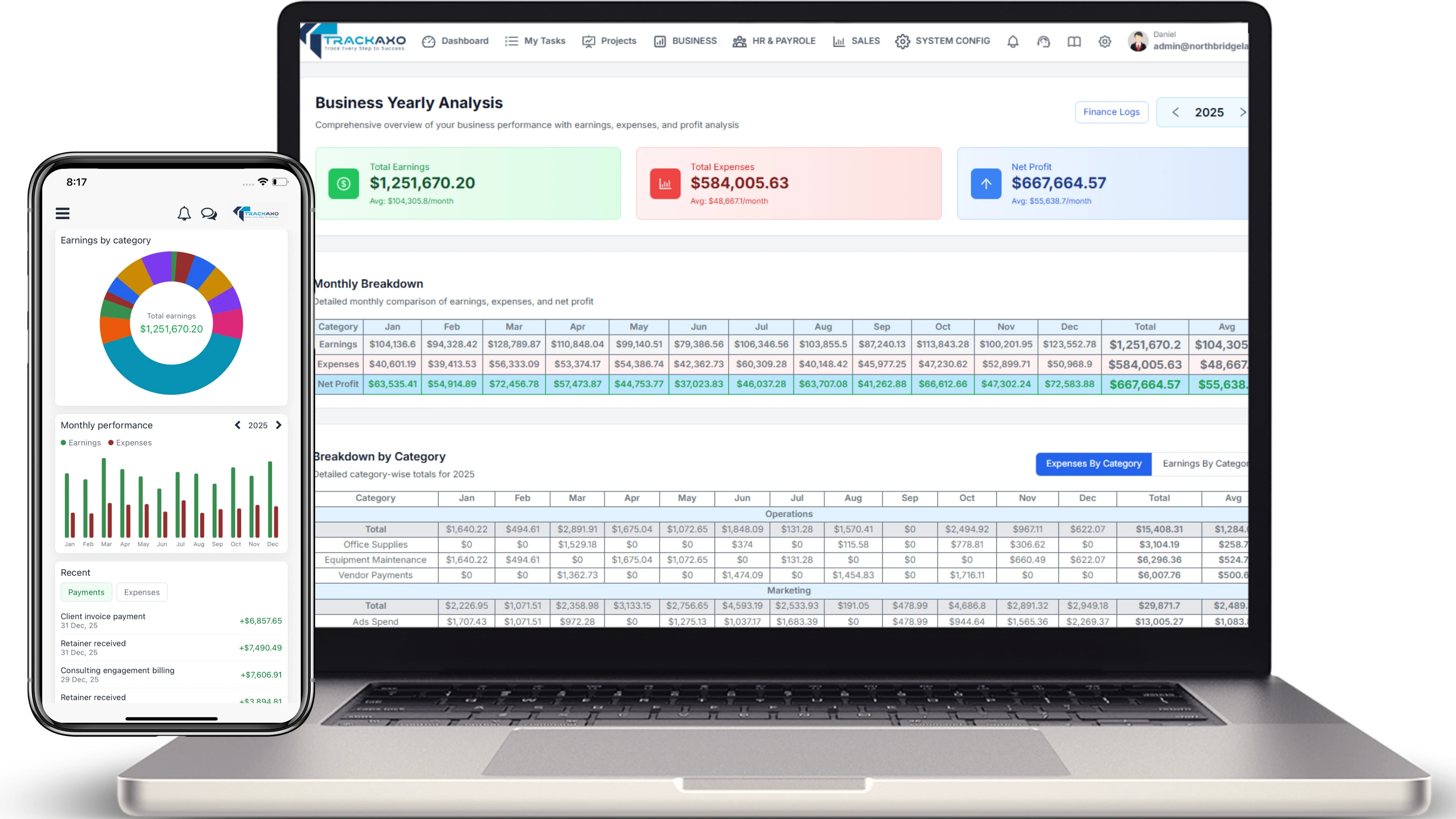
TrackAxo business reports: utilization, revenue, and delivery KPIs in one leadership view (see all modules on TrackAxo).
Spreadsheets vs point tools vs unified ERP
Replacing spreadsheets with more spreadsheets dressed as SaaS does not help. Point tools (Jira + BambooHR + QuickBooks) can work if integrations are disciplined—but most software companies under-invest in the graph connecting them.
- Spreadsheets: flexible, ungoverned, non-auditable at scale.
- Point tools: best-of-breed per function; integration debt accumulates.
- Unified ERP for software companies: shared entities (project, person, client, time, invoice) with role-based views.
- Custom modules: when differentiation requires bespoke workflows adjacent to the ledger—see our ERP build vs extend guide.
What software and digital teams need from an ERP
Generic manufacturing ERPs mis-fit dev shops. Prioritize modules that mirror how you sell and deliver:
Delivery and projects
Your ERP should own the delivery graph—not just mirror a Jira export. That means active projects, assignees, and status visible next to time and billing context.
- Project and task management with client visibility options.
- Time tracking tied to projects and roles—not orphan timesheets.
- Scrum or kanban views without exporting to a separate PM tool.
- Milestone billing and fixed-fee vs T&M rules.
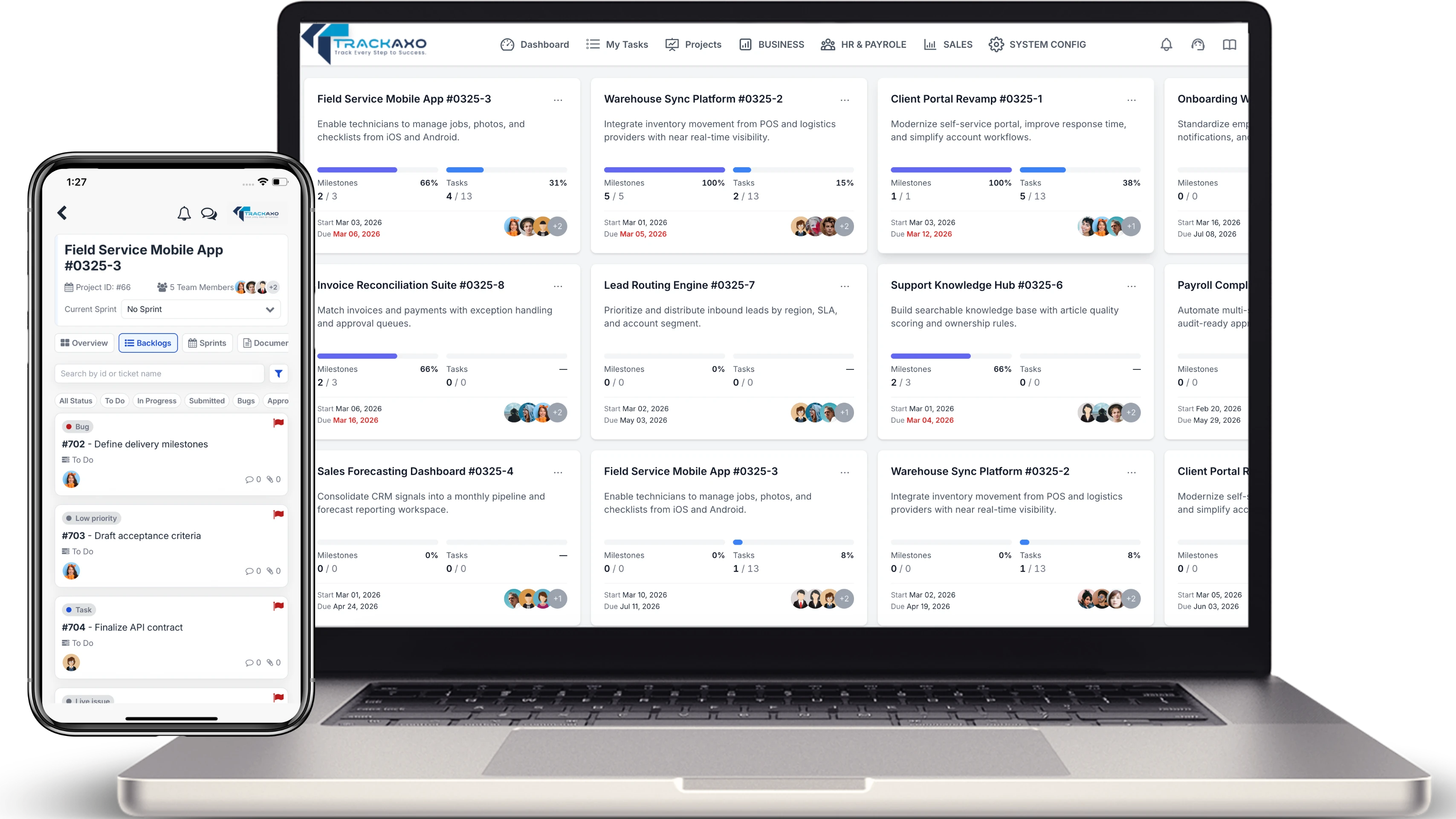
Project portfolio and planning in TrackAxo—tasks, owners, and progress tied to the same workspace as time and finance.
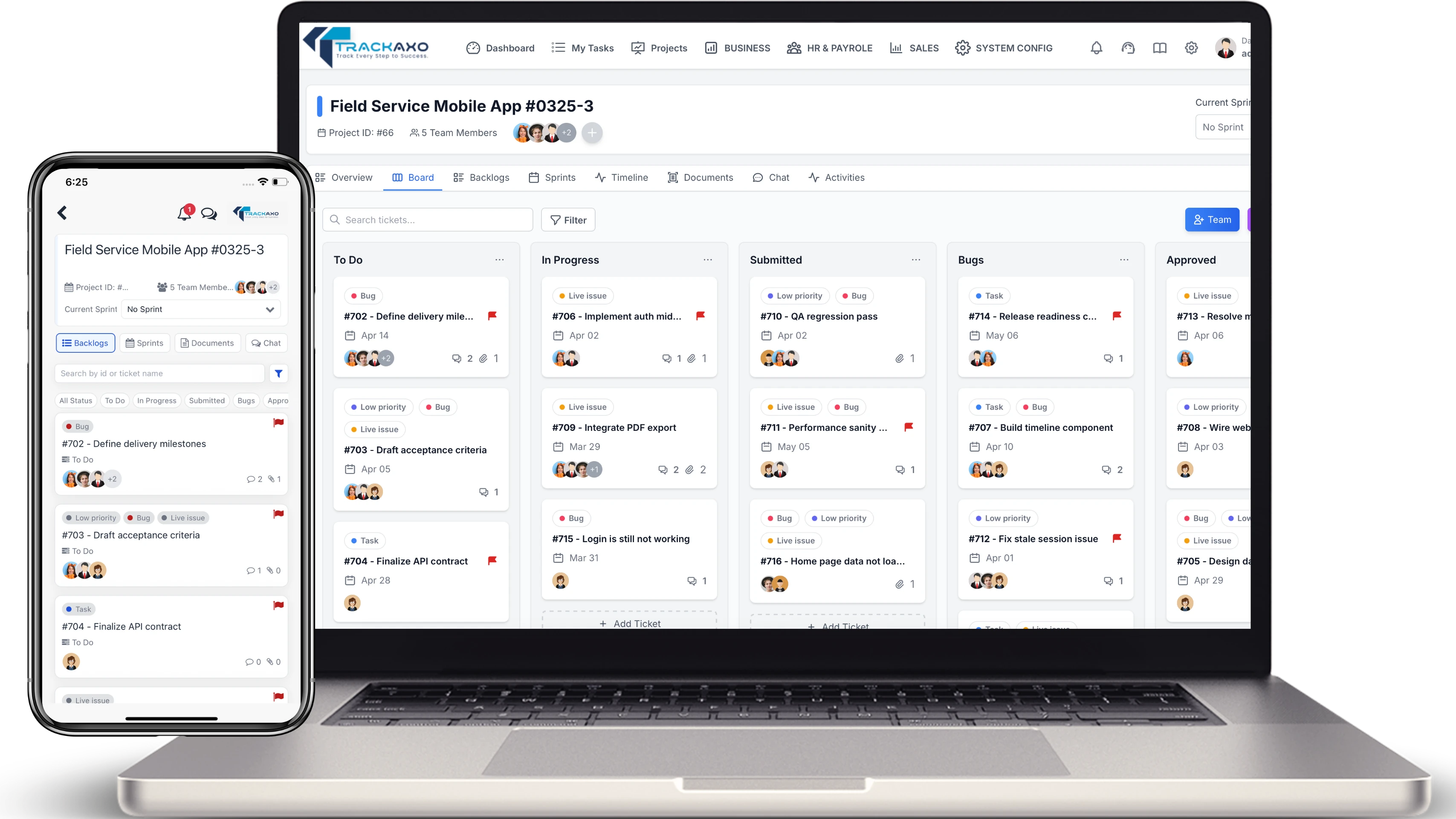
Scrum boards and sprint execution without a separate PM subscription.
People operations
Headcount, leave, and attendance should inform capacity—not sit in a separate HR tool that delivery never opens.
- Employee records, departments, and role permissions.
- Leave and attendance aligned to capacity planning.
- Payroll-ready salary structures, allowances, and deductions.
- HR analytics: headcount, attrition, bench time.
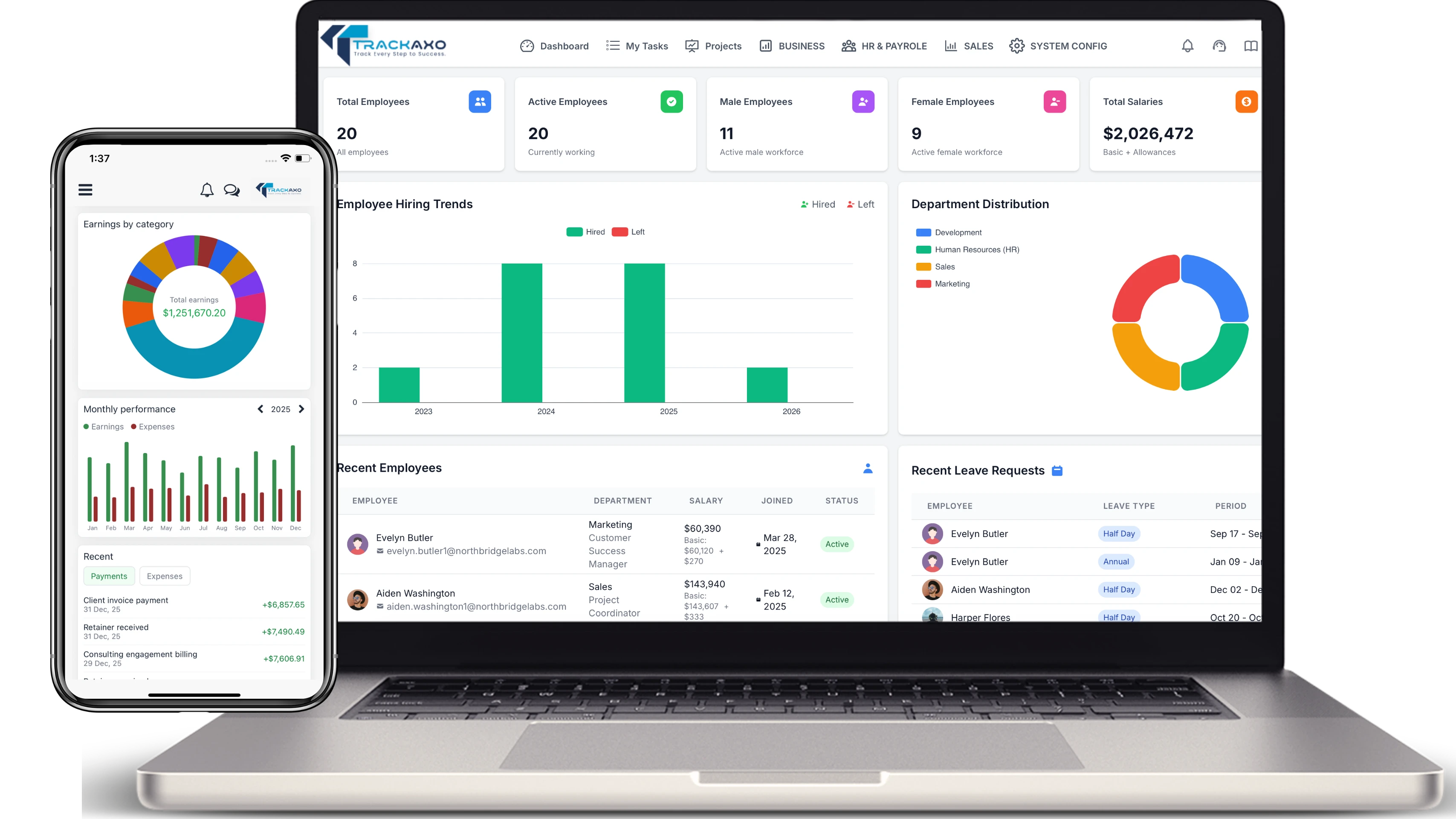
HR and payroll dashboard: departments, roles, and compensation structures in one place.
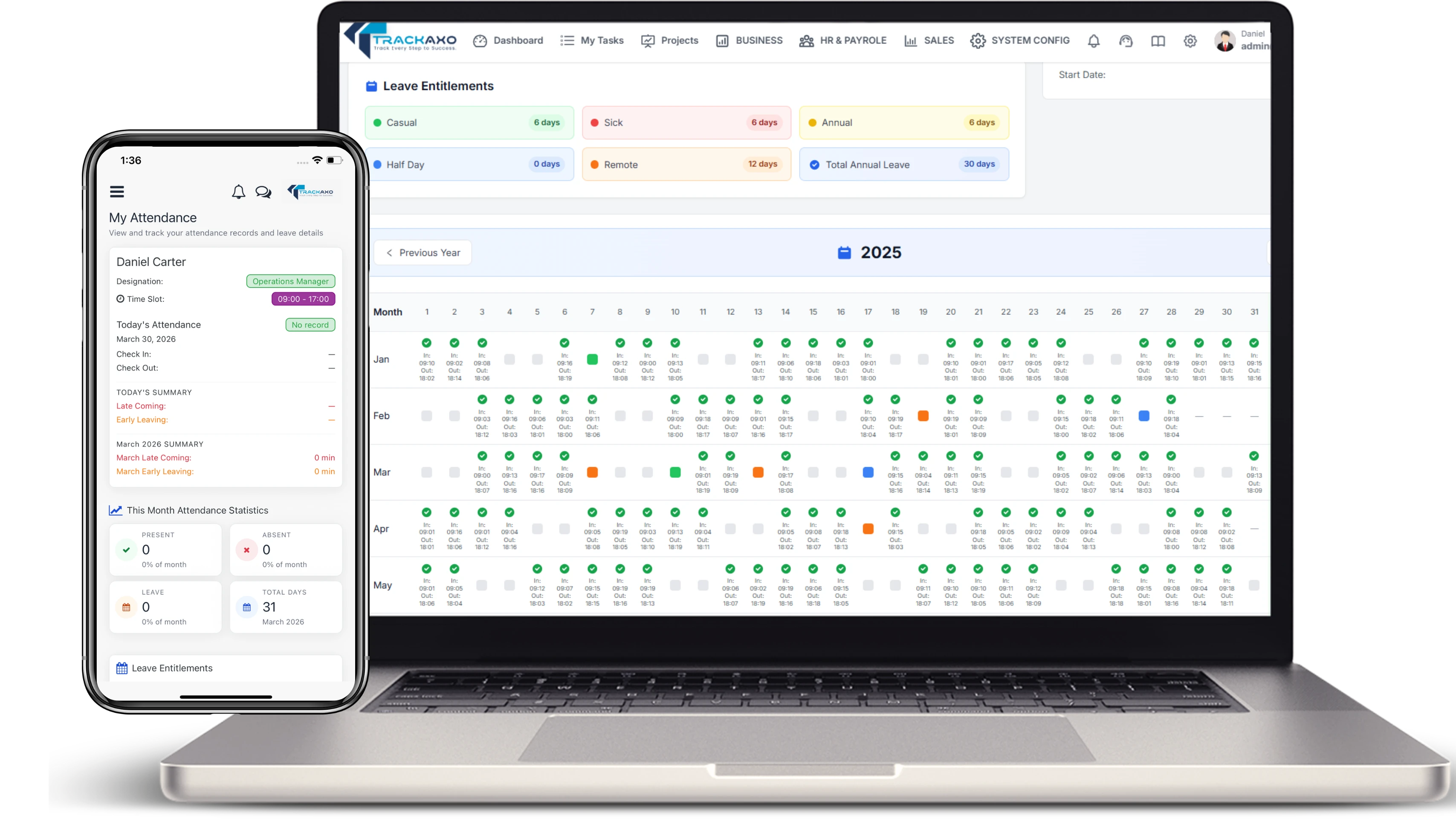
Leave policies and attendance records linked to the people data finance and PM already use.
Finance and revenue
- Income tracking, expenses, and project costing.
- Invoicing connected to approved time and milestones.
- Budget vs actual by project or practice line.
- Dashboards leadership can open without requesting a export.
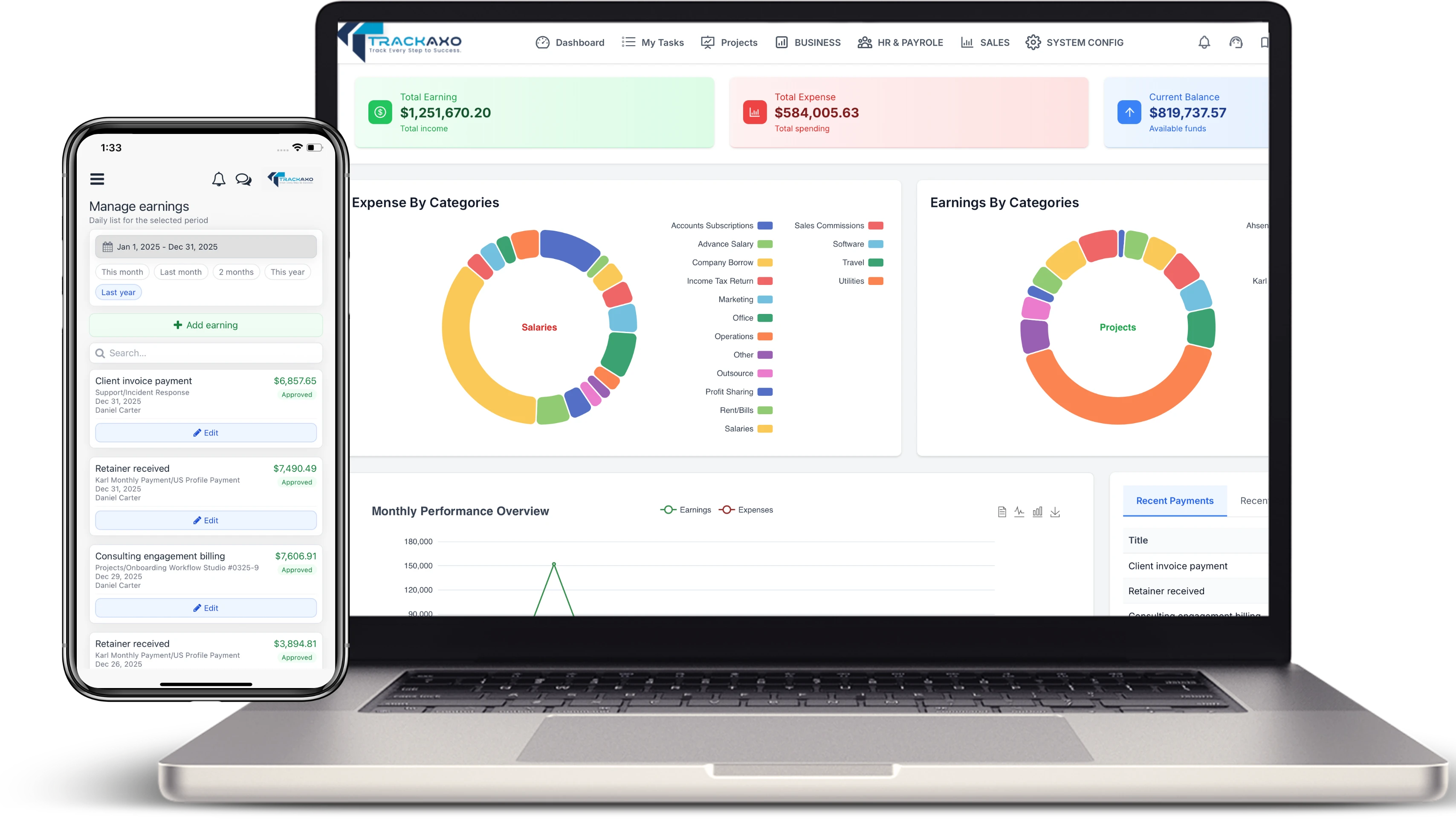
Financial management: income, expenses, budgets, and project costing—not a shadow spreadsheet beside QuickBooks.
Sales and CRM (often overlooked)
- Pipeline linked to delivery capacity—not fantasy dates.
- Client records shared with project onboarding.
- Quotes and contracts feeding project setup.
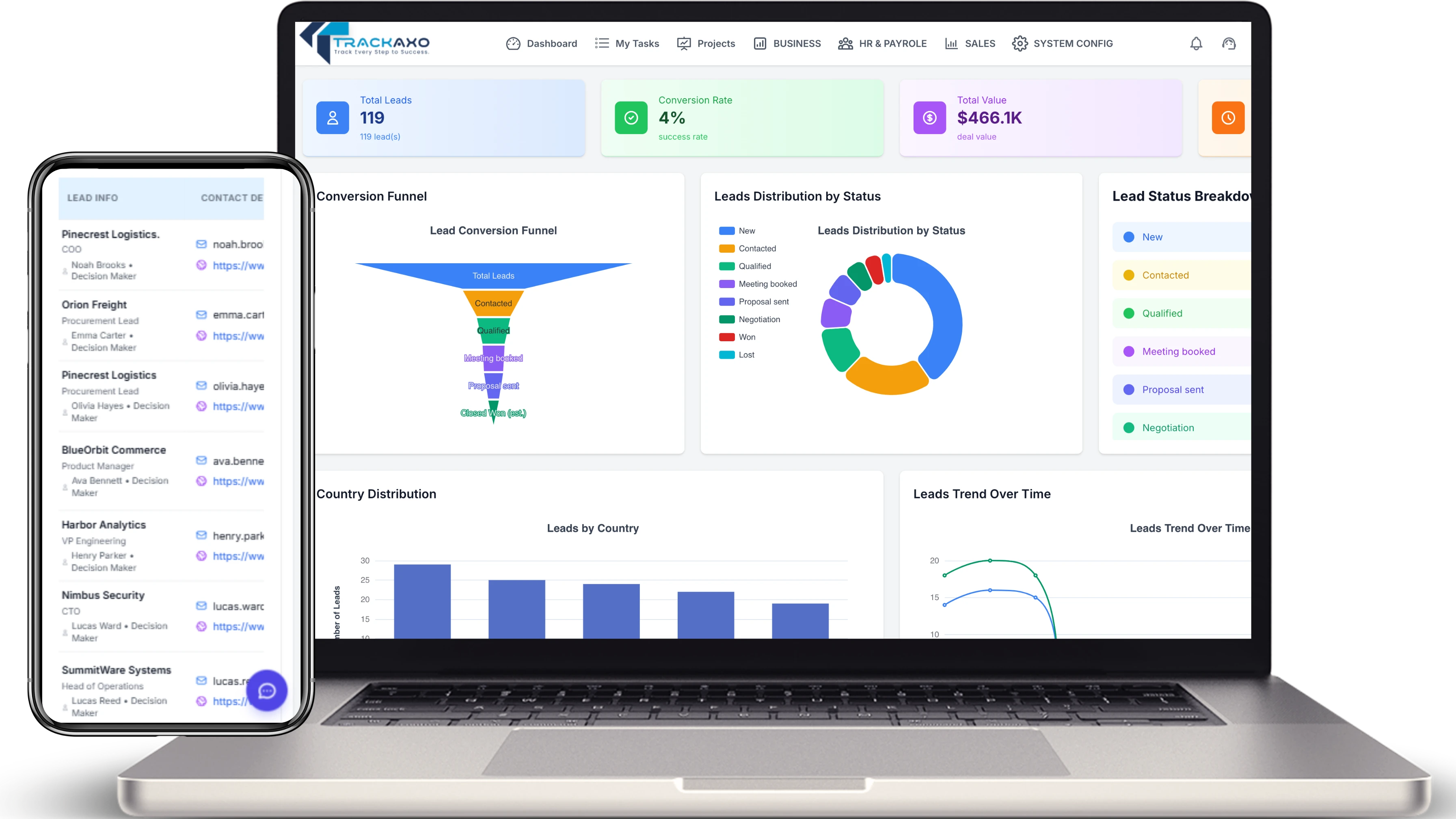
Sales pipeline and client records connected to delivery—so pipeline conversations reference real bench and project load.
Desktop execution tracking matters for distributed teams: who owns a task, what blocked it, and how that rolls up to client status. That is why platforms like TrackAxo - ERP for software companies ship a Desktop Tracker alongside PM and HR—not as a separate silo.
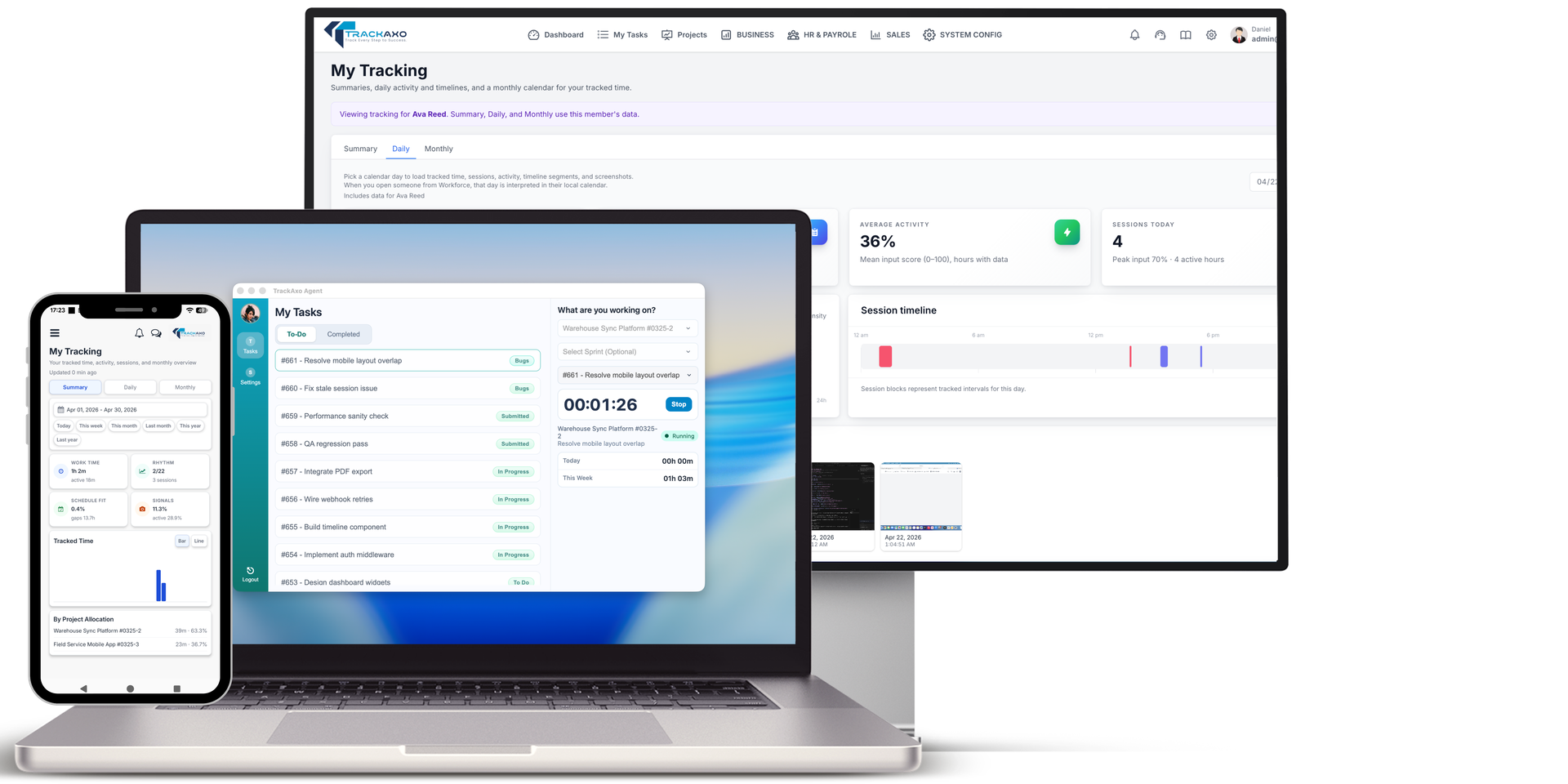
Desktop Tracker: task ownership, due dates, and status updates roll up to project and client views.
TrackAxo and the productized pattern
We built TrackAxo because we kept rebuilding the same operational graph for dev shops: projects, time, HR, payroll, finance, and sales in one platform—with a Forever Free tier for small teams to start without enterprise procurement cycles. On trackaxo.html you can browse every module screenshot interactively; if your needs map to standard software-company operations, productized ERP beats a six-month custom build.
Explore the full module breakdown on TrackAxo's ERP for software companies page—project management, HR & payroll, financial management, sales pipeline, Desktop Tracker, and team mobile apps. When your workflows are standard, starting there frees budget for differentiated product engineering instead of internal ops code.
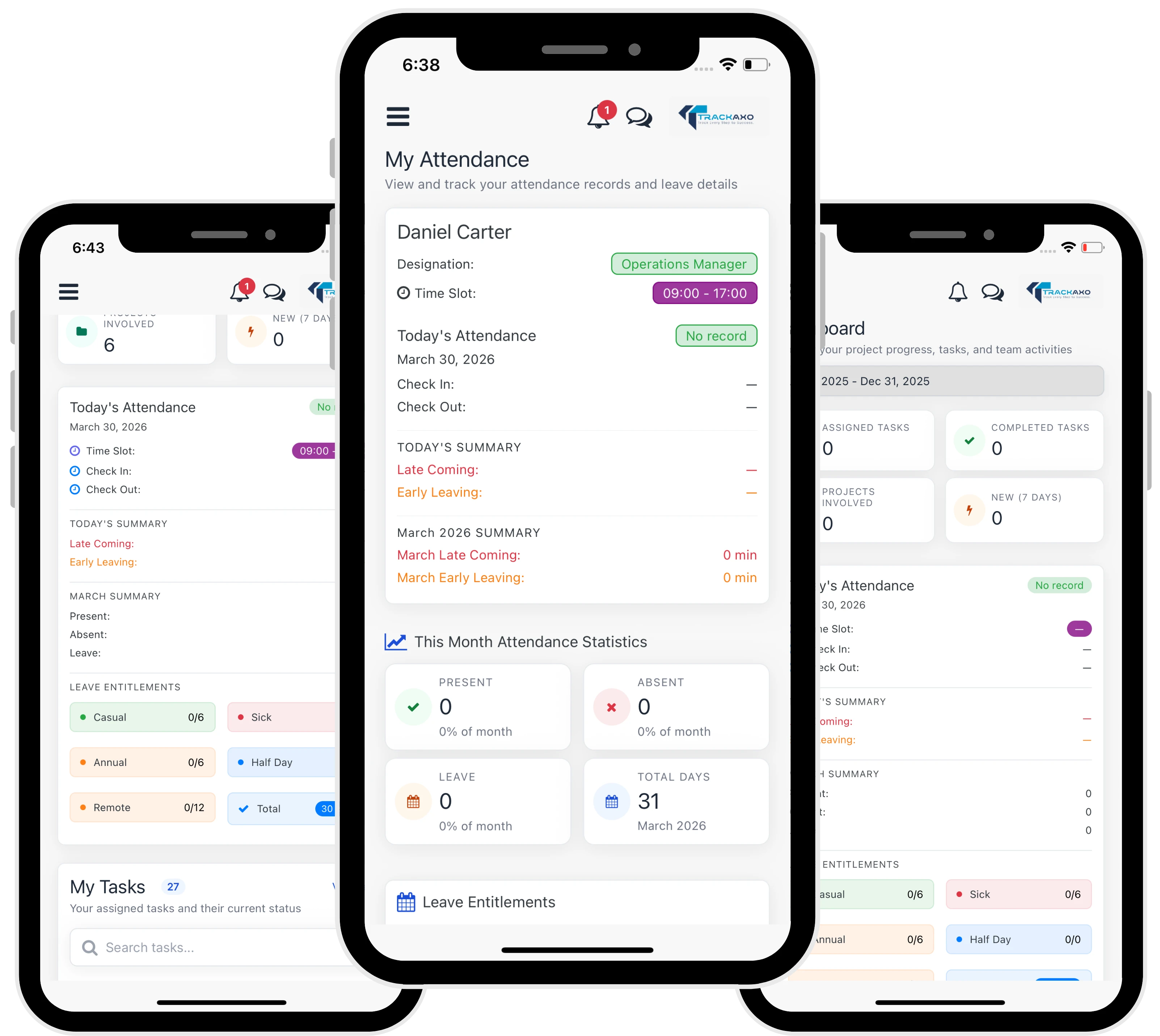
TrackAxo Teams mobile app: attendance, leave, expenses, and tasks synced with the web workspace—same roles and permissions on the phone.
When TrackAxo is enough
- Software agency or digital product studio under ~100 people.
- You need one login for PM, time, leave, and invoicing.
- You want to start free and scale licenses as headcount grows.
- Finance still uses a dedicated GL but needs operational truth upstream.
When to extend or build custom
Regulated domains, unusual revenue recognition, or deep ERP general-ledger replacement still warrant custom work. The pattern we recommend matches extend vs build: keep the ledger authoritative, unify operations adjacent to it. Our consolidating ops tooling article covers rollout sequencing without drama.
Migration playbook: from spreadsheets without stopping delivery
Phase 0 — Name the system of record
Decide which numbers are authoritative for utilization, revenue, and headcount. Kill shadow tabs explicitly—socialize that the ERP (or TrackAxo) wins arguments.
Phase 1 — Projects and time
Migrate active projects and cost rates. Run parallel reporting for one billing cycle if needed. Fast win: consultants stop re-keying timesheets into invoices.
Phase 2 — HR and leave
Connect attendance and leave to capacity views. Payroll integration can follow once data is trusted.
Phase 3 — Finance and pipeline
Layer invoicing, expenses, and sales pipeline when project costing is stable. Leadership dashboards become credible.
- Avoid big-bang holiday migrations that freeze billing.
- Assign module owners in ops, finance, and delivery—not only IT.
- Measure exports per week; goal is downward trend to zero.
- Keep a rollback plan for the first month—then delete the old tabs.
KPIs that prove the move worked
- Days to close monthly books.
- Hours spent per week on manual spreadsheet merges.
- Percentage of invoices generated from approved time/milestones.
- Forecast accuracy: pipeline vs delivery capacity.
- Time to answer "what is margin on client X?" (target: minutes, not days).
Spreadsheets scale flexibility; ERP scales truth. Software companies need both—but not for the same job.
Triaxo Operations Advisory
Talk to us
If you recognize these signs, start with a two-week ops diagnostic: map tools, entities, and reporting gaps. We will recommend TrackAxo, phased integration, or custom enterprise applications—whichever is the smallest durable fix. For productized ops, begin on TrackAxo; for bespoke workflows, we build adjacent to your ledger rather than rip-and-replace on day one.
Recent Posts